
Momentum Niro Wi-Fi Garage Door Controller
Firmware Update Instructions
Please confirm this is your camera
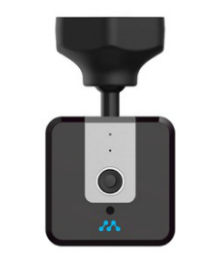
Step 1 Confirm your camera matches the picture shown
Step 2 Download the new firmware from the link below
Note: DO NOT CHANGE THE FILE NAME
Step 3 Upload the file onto a microSD card
Note: Ensure the file name is ezviz.dav and that the microSD card capacity does not exceed 128GB
Step 4 Unplug your camera and insert the microSD card from Step 3
Step 5 Plug in the camera and wait for the camera’s indicator light to start blinking blue. This may take a few minutes.
Step 6 Important: Remove the microSD card to complete the update
Note: If you would like to use the microSD card to store recorded clips, remove the firmware file ezviz.dav before reinserting the microSD card